
Petshots: Building a Real SaaS Product on AWS
A Founder’s Guide to Cloud Architecture — and the Exam That Changed How I Think
By Mark Gingrass
A note on how to read this guide
This is not a textbook. It is a founder’s account — written first-person — of what I actually built, why I made each decision, and what I learned along the way. If you are studying for the AWS Solutions Architect Associate (SAA-C03) exam, you will find exam tips throughout. If you are a developer who just wants to understand how a modern cloud-native SaaS product is wired together, you will find that too. And if you are an aspiring cloud architect who learns best by seeing a real product evolve — rather than reading theoretical slide decks — you are exactly the reader I had in mind.
Every service name introduced in this guide is also expanded in the Glossary at the end. When I use an acronym for the first time, I spell it out in full. When I use it again, I occasionally remind you what it stands for — not because I think you forgot, but because repetition is how technical vocabulary actually sticks.
Live at:
Foreword — From Clicking Buttons to Commanding the Cloud
Not long ago, my entire AWS experience was clicking around the console — the browser-based control panel where you can spin up a server, create a database, or launch a hundred other things by pointing and clicking. It felt powerful. It felt real. But I was always just a few wrong clicks away from not knowing what I had actually done or how to undo it.
Then I started using the AWS CLI — the Command Line Interface, a terminal program that lets you talk to AWS directly by typing commands. This changed everything. Instead of hunting through menus, I could type exactly what I wanted. More importantly, I could see what I was doing. A command has parameters. Parameters have names. Those names tell you what AWS is actually thinking about when it responds to your request.
Then I started building this app — Petshots — and the complexity grew faster than I expected. Multi-service architectures, IAM (Identity and Access Management) policies, VPC (Virtual Private Cloud) networking, CIDR (Classless Inter-Domain Routing) blocks, presigned URLs, JWT (JSON Web Token) authorizers... I was hitting concepts I had read about but never had a concrete reason to understand deeply.
That is when I started asking Claude — Anthropic’s AI assistant — a lot of questions. Not “write this code for me” questions, but “why does this work this way?” questions. Why does a NAT (Network Address Translation) instance cost less than a NAT Gateway but have no HA (High Availability)? What is the difference between an IAM role and an IAM user? Why does an S3 presigned POST work differently from a presigned PUT?
What I discovered was that building a real product is the best possible preparation for the SAA-C03 certification exam. The exam asks you to reason about trade-offs between services. Building a product forces you to make those trade-offs with real money, real users, and real consequences. When you have to choose between a NAT Gateway at $32/month and a NAT instance at $3.50 a month for a zero-revenue startup, that is not a textbook question — it is a genuine business decision, and the reasoning behind it is exactly what the exam is testing.
This guide is the companion to that journey. I will walk you through every layer of the Petshots architecture — not just what it is, but why it is that way, what the business trade-off was, and how the same concept shows up on the exam.
Let us start with the product itself.
What We Built, and Why
The Problem
I have a dog named Ollie. Every time I want to take him somewhere new — a dog bar, a boarding facility, a doggie daycare — they ask for proof of vaccination. Specifically his rabies certificate. And every single time, I scramble. I dig through emails, I search PDF folders, I ask my vet’s office to resend something. It is embarrassing and it takes minutes I do not have when I am standing at the front desk with an impatient receptionist and an excited 65-pound dog.
My workaround, before building this app, was to ask Claude to search my Gmail for rabies records. That is not a product. That is a hack. And if my workaround for the problem is asking an AI to grep my email, the problem is real and the opportunity is concrete.
The Wedge
The last-mile retrieval moment is the product’s core: at the door, on your phone, with the front desk staff waiting — pull up proof of vaccination in under ten seconds. That is the founding promise.
Everything else — reminders, sharing with groomers, medication tracking — is built on top of that wedge. But the wedge has to work perfectly first.
What the App Does
Petshots is a SaaS application (Software as a Service — you use it through a browser without installing anything) for pet owners to:
Store vaccination records — upload PDFs or photos of your dog’s or cat’s vaccine certificates. Label them (Rabies, DHPP, Bordetella) and attach an expiry date.
See at a glance what is current and what is overdue — a color-coded status system shows which vaccines are current (green), due soon within 30 days (amber), or expired (red). No spreadsheet needed.
Show records at the door — one tap opens the document on your phone. There is a dedicated “Quick Show” button that pulls up your most important cert immediately.
Share a pet passport — generate a QR (Quick Response) code link that anyone can scan. No login required on the recipient’s end. Facilities can verify your pet’s status without you standing there.
Get reminders — email notifications before vaccines expire, so you never get caught off guard at check-in.
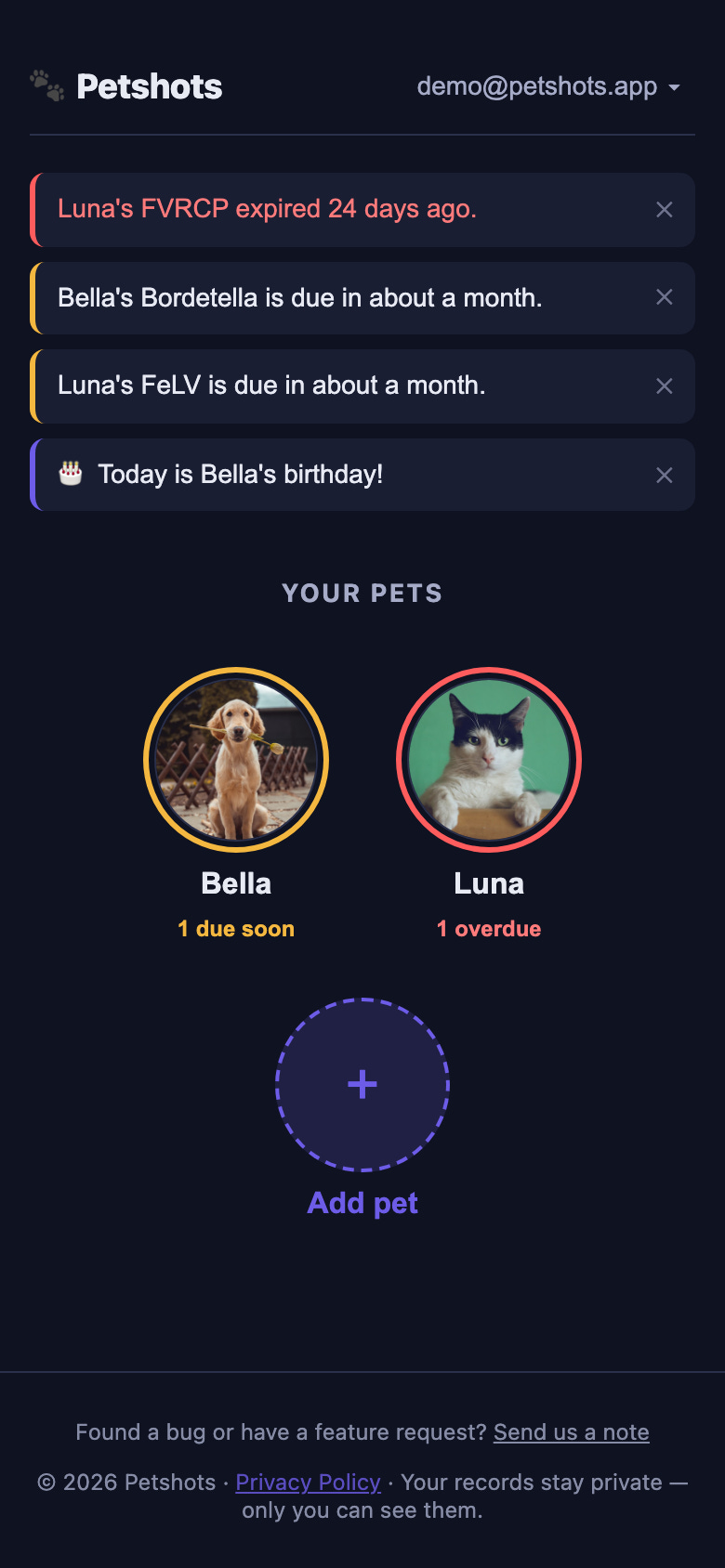
Here is what that looks like in practice. The dashboard leads with the pets themselves — each portrait ringed in the color of its most urgent record — and surfaces anything that needs attention as a banner up top:
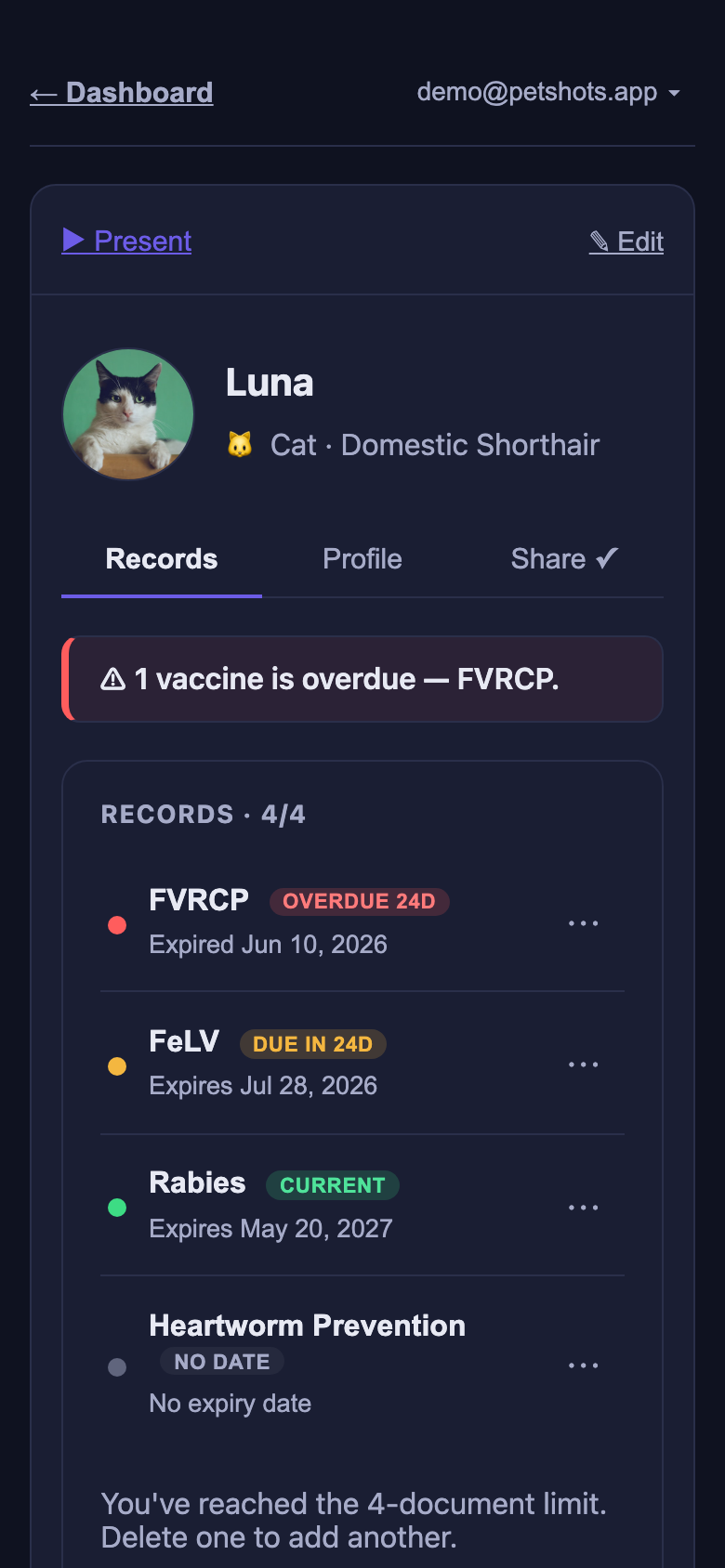
Tapping a pet opens its record list. All four status states read at a glance — this one screen is the product’s core promise delivered:
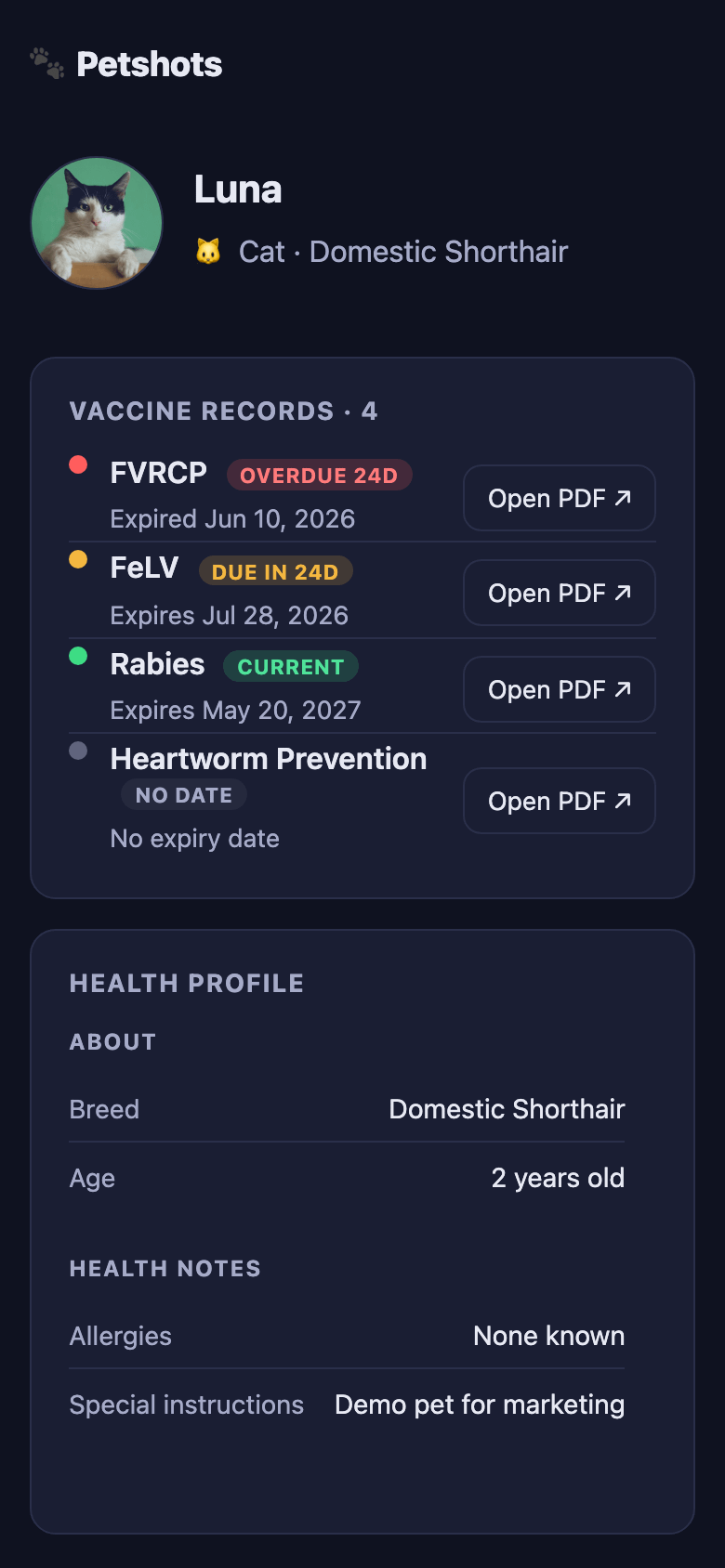
And this is the shareable passport — the public page a groomer or boarding facility sees when they scan the QR code. No login, no account; just the records, their status, and links to the certificates:
It supports up to three pets on the free tier. Pet photos, per-pet record tracking, and a shareable public passport page are all included.
You can see it live at
https://petshots.app
— that URL is the real production application.
Why We Built It on AWS
I chose AWS deliberately. I was working toward the AWS Solutions Architect Associate certification and I wanted the exam prep to be grounded in something real. There is a meaningful difference between understanding a service because you read a diagram and understanding it because you made a decision about it that cost or saved real money.
AWS also happens to be exactly the right choice for this kind of product: pay-per-use pricing means a zero-revenue startup pays almost nothing when nobody is using it, and the same architecture scales to millions of users without a rewrite.
The Architecture in Full
Before we walk through each piece, here is the complete system laid out visually. Every box in this diagram is a real AWS service, deployed and live. The solid arrows are the request paths a user actually exercises; the dashed arrows are service-to-service trust and background work.
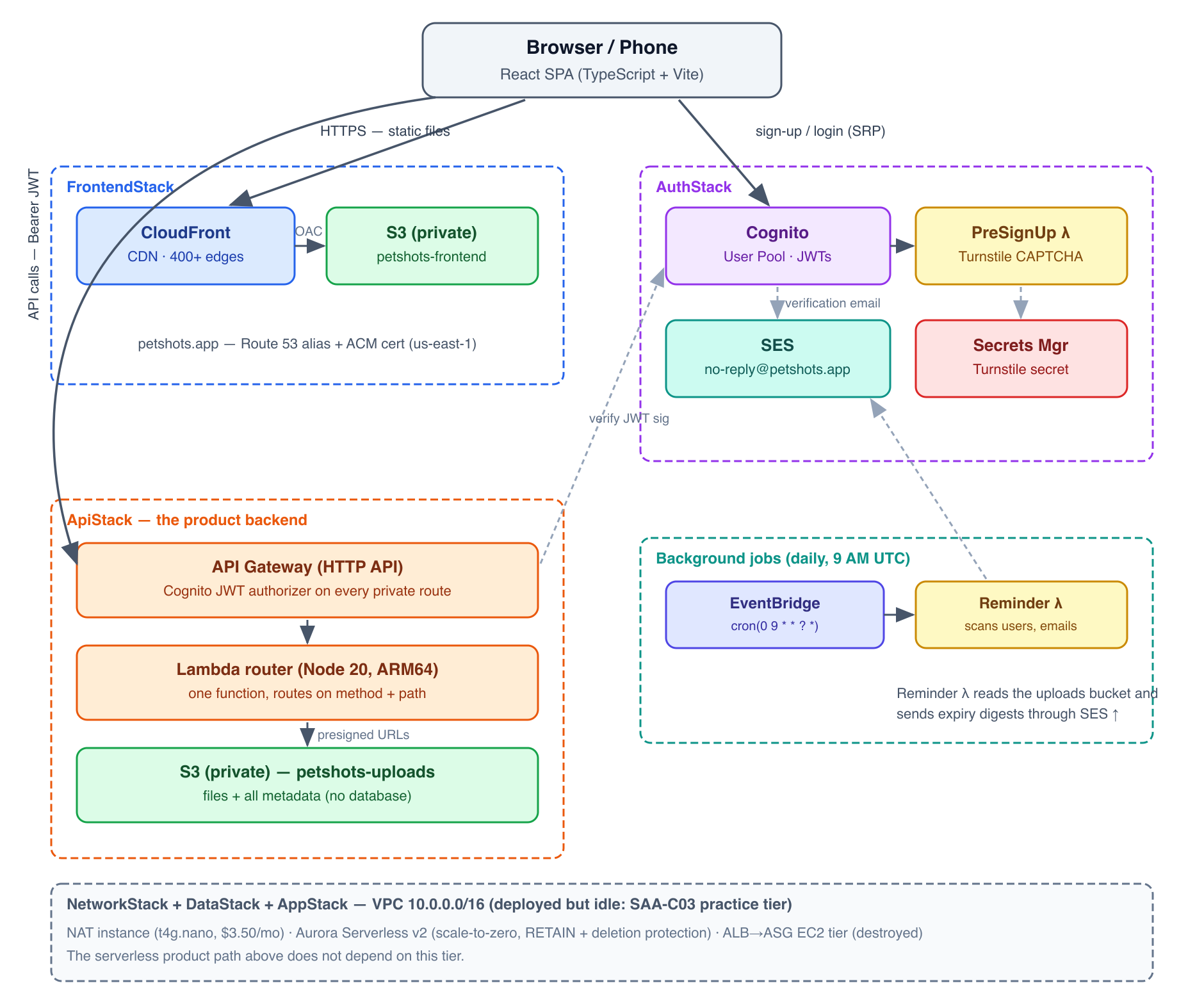
Five CloudFormation stacks deploy all of this. A stack is the unit of deployment in AWS infrastructure-as-code: a named collection of resources that are created, updated, and destroyed together. Think of a stack the way you would think of a department in a company — self-contained, with defined interfaces to the other departments.
The Network Foundation
What a VPC Actually Is
A VPC (Virtual Private Cloud) is your private network inside AWS. Picture AWS’s global infrastructure as a massive shared office building — thousands of tenants, but everyone is on their own locked floor. Your VPC is your floor. Other tenants cannot see your resources, cannot route traffic to your databases, cannot even acknowledge your servers exist. The isolation is enforced by AWS at the hardware level.
From a business standpoint, the VPC is the security perimeter for your entire product. If your VPC is not configured correctly, all the application-level security in the world can be undermined. This is why cloud architects spend so much time on networking — it is the foundation everything else rests on.
Every resource in this guide — every Lambda function, every database, every EC2 (Elastic Compute Cloud) instance — runs inside the Petshots VPC.
Understanding the Address Space
Our VPC uses the address block 10.0.0.0/16. Let me unpack what that means, because CIDR (Classless Inter-Domain Routing) notation shows up constantly in AWS work and on the exam.
An IP (Internet Protocol) address is a 32-bit number, written in four groups of digits separated by dots: 10.0.0.0. The /16 after the address is a prefix length — it tells you how many of those 32 bits are fixed (the “network” part) and how many are free for you to assign to individual resources (the “host” part).
With /16, the first 16 bits are fixed (10.0). The remaining 16 bits are yours. 2^16 = 65,536 possible addresses. That is your VPC’s capacity.
When you carve subnets out of the VPC, you take a slice of those 65,536 addresses and dedicate it to a specific zone and purpose. Here are the CIDR ranges that commonly appear on the exam, with their host counts:
CIDRFixed bitsAddressesAWS usableExample use/161665,53665,531Entire VPC/2424256251Medium subnet/28281611Smallest AWS allows
Why does AWS subtract 5 from every subnet? AWS reserves the first four addresses and the last address in every subnet for internal purposes: the network address, the VPC router, DNS, future use, and the broadcast address. So a /28 subnet (16 addresses) only gives you 11 usable IPs. The exam tests this — knowing that /28 is the smallest allowed subnet and it yields only 11 usable IPs is worth remembering.
Why 10.x.x.x? This is private address space defined by RFC 1918 — address ranges reserved for private networks that will never appear on the public internet. The three RFC 1918 ranges are 10.0.0.0/8, 172.16.0.0/12, and 192.168.0.0/16. Using private space means our internal addresses never collide with public internet routing.
Exam Tip: CIDR questions appear frequently. Know that
/16= 65,536,/24= 256,/28= 16 (subtract 5 for AWS reservations to get usable IPs). Also know the three RFC 1918 private ranges — the exam sometimes asks which CIDR is valid for a VPC.
Subnets and Availability Zones
A subnet is a subdivision of the VPC, pinned to exactly one AZ (Availability Zone). An Availability Zone is a physically separate data center — meaning separate power feeds, separate cooling systems, separate fiber paths in from the internet — within a geographic region. The region us-east-1 (Northern Virginia) has six AZs, named us-east-1a through us-east-1f.
The purpose of multiple AZs is fault isolation. If a power failure or network event takes down one data center, your resources in other AZs are completely unaffected. This is the core of HA (High Availability) design on AWS — spread your resources across at least two AZs so that no single failure takes down your entire product.
Petshots uses two AZs and three subnet tiers, giving us six subnets total (three tiers × two AZs):
TierAWS CDK LabelWhat Lives HereInternet Access?PublicPUBLICNAT instanceDirect (via Internet Gateway)AppPRIVATE_WITH_EGRESSEC2 / AppStack (when deployed)Outbound only (via NAT)DataPRIVATE_ISOLATEDAurora clusterNone — completely isolated
Let me explain each tier in plain English:
Public subnets have a route to an IGW (Internet Gateway) — the door between your VPC and the public internet. Resources in the public subnet with a public IP address can send and receive traffic to and from anywhere on the internet. Our NAT instance lives here.
App subnets (Private with Egress) have no direct route to the internet inbound — nothing on the internet can initiate a connection to these resources. But they can make outbound connections — to download a software package, to call an AWS API endpoint, to send an email through SES (Simple Email Service). They do this by sending traffic through the NAT instance in the public subnet, which forwards it out through the Internet Gateway and relays responses back. This one-way door pattern is the business logic of the App tier: your application servers can talk to the world, but the world cannot directly poke at them.
Data subnets (Private Isolated) have no route to the internet in either direction. Aurora cannot initiate a connection outbound and nothing can initiate a connection inbound. The only resources that can reach the database are those in the same VPC with the correct Security Group (SG) permissions configured. This is defense-in-depth: even if an attacker somehow compromised the application tier, the database is behind an additional layer of isolation.
All of this is easier to hold in your head as a picture. Here is the actual Petshots VPC — two Availability Zone columns, three tiers deep, with the real CIDR block each subnet was assigned:
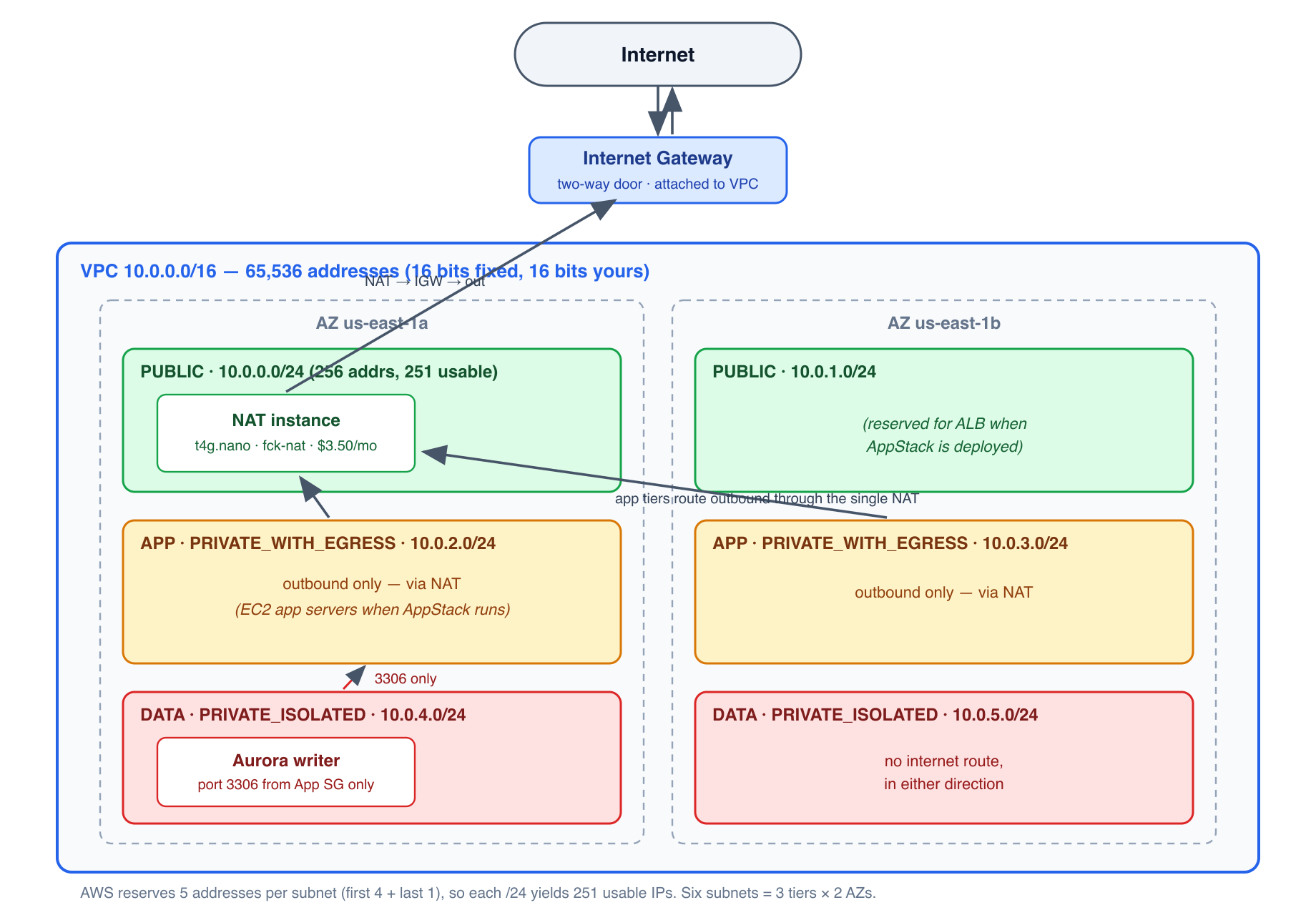
Trace any packet’s options on this diagram and the tier rules become mechanical: traffic in the green tier can go both ways through the Internet Gateway; the amber tier can only go out, and only via the NAT box in the green tier; the red tier goes nowhere.
Exam Tip: Subnet type questions are among the most common in the VPC section. Memorize these:
PRIVATE_ISOLATED= no internet at all.PRIVATE_WITH_EGRESS= outbound internet via NAT, no inbound.PUBLIC= two-way internet via IGW. Data tiers (databases, caches) should almost always bePRIVATE_ISOLATED.
Internet Gateway vs NAT — A Critical Business Trade-off
The IGW (Internet Gateway) is a fully managed, highly available VPC component that enables two-way communication between resources in your public subnets and the public internet. It is effectively free — no hourly charge, no data processing charge. You simply attach it to your VPC and update route tables.
The NAT (Network Address Translation) device provides the one-way outbound door for private subnets. “Network Address Translation” means it takes packets from your private resources (which have private IPs that are not routable on the public internet) and rewrites them to appear as if they came from the NAT device’s own public IP — then relays the responses back. The result: your private server can call an external API, but the external API cannot initiate a connection back to your private server.
AWS offers two ways to implement NAT, and this is one of the most-tested trade-offs on the exam:
NAT GatewayNAT InstanceManaged byAWS (fully managed)You (it is an EC2 VM)HA (High Availability)Yes — HA within the AZ, but you need one per AZ for full HANo — single point of failureScalingAutomaticManual (you resize the EC2)BandwidthUp to 100 GbpsLimited by EC2 instance typeCost~$32/month for one AZ + data processing fees~$3.50/month for t4g.nano + EBSPatching / updatesAWS handles itYou are responsible
Petshots chose a NAT instance using the open-source fck-nat AMI (Amazon Machine Image — a pre-packaged OS image for EC2) running on a t4g.nano (a tiny ARM-based VM). The business reasoning: at zero revenue and essentially zero traffic, paying nine times more per month for a managed NAT Gateway delivers no meaningful benefit. The single point of failure is acceptable when the app is in early-stage growth — the cost savings matter more.
This is a classic startup vs enterprise trade-off. A bank would never choose a NAT instance. A zero-revenue SaaS startup probably should. The SAA-C03 exam tests your ability to recognize which scenario calls for which choice.
Exam Tip: When the exam says “production workload” or “HA requirement,” choose NAT Gateway. When the exam says “cost optimization” or “small workload,” a NAT instance is defensible. Know that a NAT Gateway is per-AZ: for full HA across two AZs, you need two NAT Gateways, doubling the cost.
VPC Endpoints — Traffic That Never Leaves AWS
A VPC Endpoint lets traffic from your VPC reach an AWS service without going out to the public internet. This matters for two reasons: security (traffic stays on Amazon’s private backbone, never crossing the internet) and cost (you avoid NAT data-processing charges for traffic that would otherwise have to leave the VPC and come back in).
There are two types, and they work very differently:
Gateway Endpoints — available for S3 (Simple Storage Service) and DynamoDB only. They are free. You add them to your route table, and traffic destined for those services is routed privately. We use one for S3 — every call our Lambda makes to the uploads bucket goes through the gateway endpoint, staying entirely on Amazon’s network.
Interface Endpoints (PrivateLink) — available for almost every other AWS service (SSM — Systems Manager, Secrets Manager, KMS — Key Management Service, SES, etc.). They work differently: each endpoint creates an ENI (Elastic Network Interface — a virtual network card) in your subnet, giving the service a private IP address inside your VPC. They cost approximately $7–8 per endpoint per AZ per month.
Here is the business math for Petshots: if we wanted interface endpoints for SSM (three endpoints: ssm, ec2messages, ssmmessages) across two AZs, that would be 3 × 2 × $7.50 = $45/month. Our entire serverless stack costs nearly nothing idle. Adding $45/month in VPC interface endpoints purely for the theoretical benefit of not using our $3.50/month NAT instance for those calls would be irrational.
We use the NAT instance for SSM and Secrets Manager access, and reserve the free S3 gateway endpoint for S3 traffic (which we use heavily for document uploads and metadata reads).
Exam Tip: Gateway Endpoints (S3, DynamoDB) = free, add to route tables. Interface Endpoints (everything else) = ~$7/mo per endpoint per AZ, use ENIs. If the exam describes a scenario where an EC2 instance in a private subnet needs to access S3 “without going through the internet” — a Gateway Endpoint is the answer. For NAT cost reduction when traffic is primarily S3 or DynamoDB, a Gateway Endpoint is usually the right recommendation.
Security Groups — Stateful Firewalls at the Resource Level
A Security Group (SG) is a virtual firewall that you attach to individual resources (EC2 instances, RDS clusters, Lambda functions in a VPC, etc.) to control which traffic reaches them.
The key architectural concept is stateful: if you allow a type of inbound traffic, the corresponding response traffic is automatically allowed outbound — you do not need to explicitly write a rule for the return path. This is different from a traditional corporate network firewall where you might need to manage both directions separately.
For Petshots:
The Aurora database Security Group allows inbound on TCP port 3306 (MySQL’s port) from resources in the App-tier Security Group only.
The NAT instance Security Group allows inbound from the VPC’s private subnets and outbound to anywhere.
API Gateway does not use VPC Security Groups (it is a managed public endpoint).
Security Groups implement the principle of least privilege at the network layer: each resource can be reached only by the resources that have a legitimate reason to reach it, on only the ports they need.
Exam Tip — Security Groups vs NACLs (Network Access Control Lists):
Security GroupNACLApplied toIndividual resource (EC2, RDS, etc.)Entire subnetStateStateful (return traffic auto-allowed)Stateless (must allow both directions)Rule typesAllow onlyAllow and DenyRule evaluationAll rules consideredLowest rule number that matches wins
NACLs (Network Access Control Lists) are the subnet-level firewall. Because they are stateless, you must write rules for both inbound and outbound directions for any connection you want to permit. NACLs also support Deny rules — you can explicitly block a specific IP range, which Security Groups cannot do (Security Groups can only allow). Petshots uses only Security Groups. NACLs appear on the exam but were not needed here.
Identity and Access
Cognito User Pool vs Identity Pool
Cognito is AWS’s managed authentication and user management service. It offers two products with confusingly similar names — understanding the difference is essential for the exam and for building real applications.
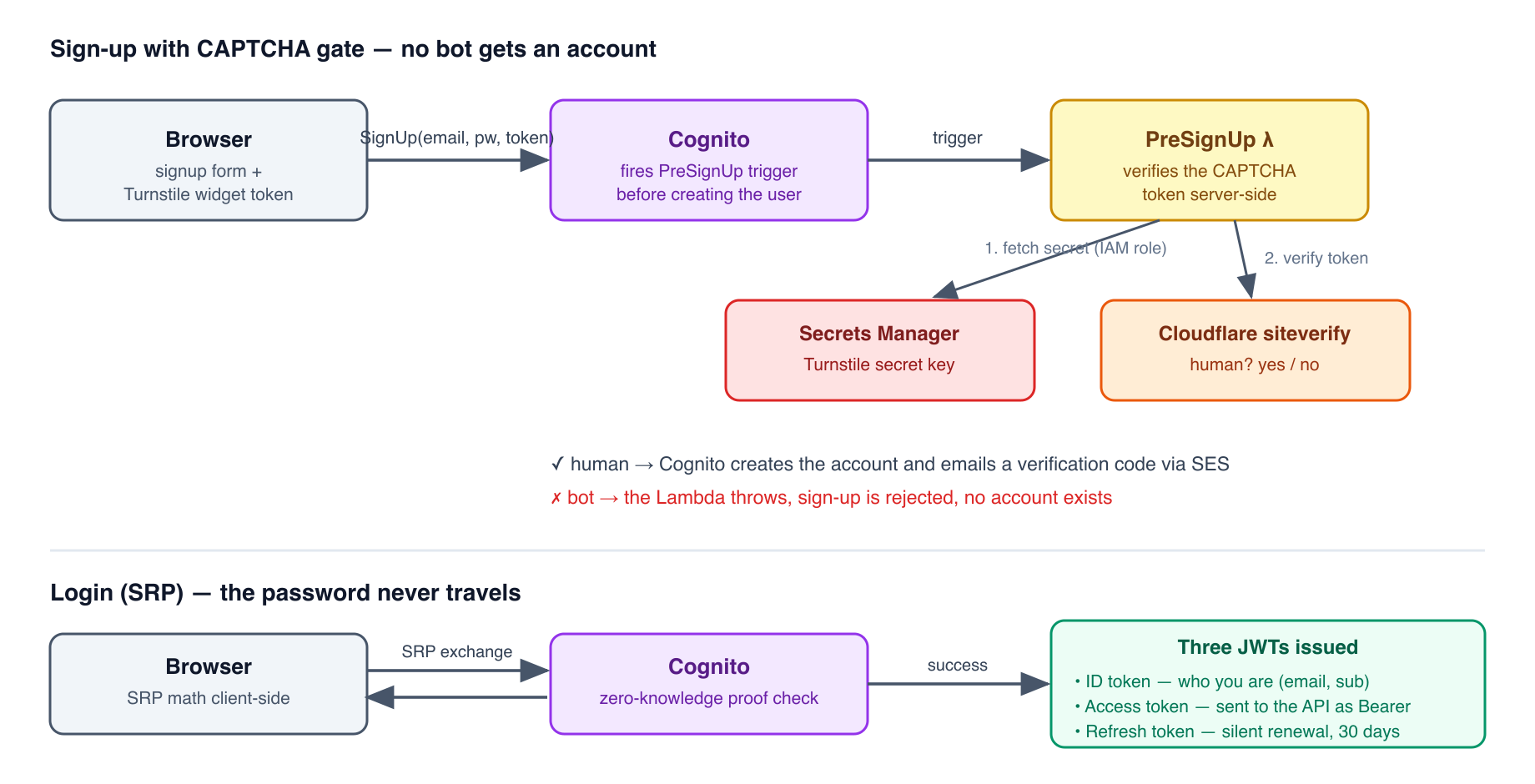
User Pool = a user directory with built-in authentication. It stores usernames (email addresses, in our case), hashed passwords, user attributes, and verification state. It handles the sign-up flow, email verification, password resets, and login — issuing JWT (JSON Web Token) tokens on successful authentication. Think of the User Pool as answering the question: “Who is this person?”
Identity Pool (Federated Identity) = exchanges tokens for temporary AWS credentials (access key, secret key, session token) so that users can call AWS services directly from the browser or mobile app — without your backend being in the middle. Think of the Identity Pool as answering: “Now that I know who this person is, what AWS resources can they touch directly?”
Petshots uses only a User Pool. Users authenticate, receive a JWT, and send that JWT to our Lambda via the API. The Lambda — running with its own IAM (Identity and Access Management) role — calls S3 on their behalf. We do not need to give users direct AWS credentials because the Lambda intermediates all S3 access. This is safer: if a user’s JWT is stolen, the attacker gets access to our API, not to S3 directly with arbitrary permissions.
Exam Tip: If a question says “users need to upload files directly to S3 from the browser using their Cognito identity,” the answer involves a Cognito Identity Pool (to exchange the User Pool JWT for temporary IAM credentials). If the question says “users authenticate and call an API,” the answer is just a User Pool and a JWT authorizer — no Identity Pool needed.
JWTs — How Authentication Works Without a Database Lookup
After a successful login, Cognito issues three tokens:
ID Token — contains claims about the user: their email address, their Cognito
sub(subject — a unique UUID that never changes even if the email changes), and any custom attributes. Use this in your application to know who the user is.Access Token — contains the user’s permissions (scopes). Use this when calling protected APIs. This is what we send in the
Authorization: Bearerheader to API Gateway.Refresh Token — long-lived (default 30 days). Used silently in the background to obtain new Access and ID tokens after they expire (default expiry: 1 hour), without requiring the user to log in again.
A JWT (JSON Web Token) is a base64url-encoded string with three dot-separated parts:
[header].[payload].[signature]

Example (simplified):
eyJhbGciOiJSUzI1NiJ9.eyJzdWIiOiI2NDY4NjQwOCIsImVtYWlsIjoib2xsaWVAZXhhbXBsZS5jb20ifQ.[RSA signature]
The header identifies the algorithm (RS256 — RSA with SHA-256). The payload contains the claims (who you are, when the token expires, what permissions you have). The signature is created using Cognito’s private RSA key and mathematically proves the payload has not been tampered with.
Anyone with Cognito’s public key (published at a well-known URL called the JWKS — JSON Web Key Set — endpoint) can verify the signature without calling Cognito at all. This is the key insight of JWT-based auth: no database lookup required at verification time. The token is self-contained proof. This is why JWTs work so well for serverless APIs — there is no session store to maintain.
Exam Tip: Know which token to use where. Access Token → for calling protected APIs (our API Gateway). ID Token → for learning who the user is in your application logic. Refresh Token → for silent re-authentication. Never send a Refresh Token to an API endpoint.
SRP — Why Your Password Never Travels on the Network
Cognito’s default login flow uses SRP (Secure Remote Password) protocol. This is worth understanding, not for the exam, but because it illustrates a core principle: you should never design a system where the password travels over the network — even encrypted.
SRP is a zero-knowledge proof of password knowledge. Both the client (your browser) and the server (Cognito) go through a mathematical exchange of derived values. At the end, both sides have confirmed they know the same password, without either side transmitting the password itself. If an attacker records every packet of the exchange, they learn nothing that helps them.
Contrast this with USER_PASSWORD_AUTH — an alternative Cognito flow where the client sends the password directly to Cognito over TLS. The password is encrypted in transit, but it still travels. SRP is strictly safer.
Exam Tip: The exam does not test SRP math. It tests that you know Cognito supports multiple auth flows.
USER_SRP_AUTHis the secure default. EnablingALLOW_USER_PASSWORD_AUTHon a public-facing app client is a security red flag unless you have a specific reason.
IAM Roles — How Services Call Services
An IAM (Identity and Access Management) Role is an AWS identity that can be assumed by a service or resource — not a human. It has no password and no static access keys. Instead, when a Lambda function assumes its execution role, AWS’s STS (Security Token Service) — remember, STS stands for Security Token Service — issues it temporary credentials (access key, secret key, session token) that expire automatically, usually within an hour.
The Petshots API Lambda has an IAM execution role that grants it precisely:
Read and write objects in the
petshots-uploadsS3 bucketRead the Turnstile secret from Secrets Manager
Send email via SES
Nothing else. Not the ability to read other buckets. Not the ability to access EC2. Not the ability to modify IAM policies. This is the principle of least privilege — a security best practice that says: grant exactly the permissions needed for the task, nothing more.
From a business risk perspective, least privilege limits your blast radius. If the Lambda’s credentials are somehow compromised (through a vulnerability in your code, a dependency, or an infrastructure misconfiguration), the attacker can only do what the role allows. They cannot pivot to other services or data.
Exam Tip: On the exam, if a Lambda or EC2 instance needs to access another AWS service, the answer is always to attach an IAM Role — never to embed access keys in code or environment variables. Roles use STS (Security Token Service) under the hood to issue auto-rotating temporary credentials. Static embedded keys are a security anti-pattern and the wrong answer.
Secrets Manager — Protecting API Keys
The Cloudflare Turnstile secret key (used to verify CAPTCHA tokens at signup) is stored in AWS Secrets Manager, not in environment variables or source code. The Lambda fetches it at runtime via its IAM role.
There is an important implementation detail worth noting: Secrets Manager secret ARNs (Amazon Resource Names — the unique identifier for any AWS resource) come in two forms. The “friendly” form omits the random suffix at the end (like petshots/turnstile-secret). The full ARN includes a six-character random suffix (petshots/turnstile-secret-RS5ju3).
If you use the CDK method Secret.fromSecretNameV2() and then call grantRead(), CDK generates an IAM policy using the partial ARN with a wildcard. But the Lambda’s actual API call uses the full ARN — and the IAM policy’s wildcard pattern does not match. The result: AccessDenied at runtime, even though you think you granted access. The fix: use fromSecretCompleteArn() with the full ARN.
I mention this not to embarrass anyone — I made exactly this mistake — but because debugging IAM permission errors is a rite of passage for anyone building on AWS, and understanding why it failed teaches you more than having it work the first time.
Exam Tip — Secrets Manager vs Parameter Store:
Secrets ManagerParameter Store (SSM)Cost~$0.40/secret/monthFree (Standard tier)Automatic rotationYes (built-in for RDS, Redshift, etc.)NoEncryptionAlways encryptedOptional (SecureString uses KMS)Best forAPI keys, DB credentials, secrets requiring rotationConfig values, feature flags, non-sensitive config
When the exam mentions automatic credential rotation for an RDS database, the answer is Secrets Manager. For non-sensitive configuration (feature flags, URLs, settings), Parameter Store is free and sufficient.
Cognito PreSignUp Lambda — Custom Verification Logic
At signup, before Cognito creates the user account, it fires a Lambda trigger called PreSignUp. Our trigger calls the Cloudflare Turnstile API to verify that the token from the browser widget is valid. If it is not, the trigger throws an error, Cognito rejects the signup, and no user account is created.
This is a CAPTCHA (Completely Automated Public Turing test to tell Computers and Humans Apart) integration — it verifies that the signup is coming from a real human using a browser, not from an automated script trying to create thousands of accounts.
Implementation note: the admin-create-user API (used in smoke tests to create throwaway test users) bypasses the PreSignUp_SignUp trigger because its trigger source is different. This means our automated tests can create users programmatically without needing a valid CAPTCHA token — the bypass is a deliberate Cognito design choice, not a security hole.
The two identity flows in this chapter — the CAPTCHA-gated signup and the SRP login that ends with three tokens in hand — look like this end to end:
The Serverless API
The Architectural Decision: EC2 vs Serverless
When I started planning the backend, I had two viable options:
Option A — Three-tier EC2: A traditional architecture with an ALB (Application Load Balancer) routing traffic to EC2 instances running a Node.js server, backed by a MySQL database on Aurora. This is the pattern most enterprise applications use. It is familiar, debuggable, and highly flexible. It also costs approximately $22–30/month minimum even when zero users are active — the EC2 instances and the ALB have hourly charges regardless of whether anyone is using the app.
Option B — Serverless: API Gateway routing requests to a Lambda function, with S3 for both file storage and metadata storage. Cost is essentially $0 when idle — Lambda charges only for the milliseconds your code actually runs. API Gateway charges per request. S3 charges per GB stored and per request.
The business decision was straightforward: a pre-revenue startup with zero guaranteed traffic has no business paying for 24/7 compute capacity. The serverless architecture scales from zero to millions of requests with no re-architecture, and the bill at zero usage is literally pennies.
I kept the EC2 stack in the codebase (AppStack) as a study artifact for SAA-C03 exam preparation, but it is destroyed (not deployed) in production.
API Gateway HTTP API
API Gateway is AWS’s managed service for creating, securing, and routing HTTP API calls. It sits in front of the Lambda and handles:
Receiving HTTP requests from the internet
Running the JWT authorizer to verify the caller’s identity
Routing the request to the appropriate Lambda handler based on method + path
Returning the Lambda’s response to the caller
There are two modern API Gateway flavors:
REST APIHTTP APIPrice$3.50/million requests$1.00/million requestsFeaturesMore (usage plans, request validation, API keys, caching)Less, but sufficient for mostLatency overhead~6ms~1msJWT/OAuth2 authorizersVia Lambda authorizer (extra cost)Native (no extra cost)
We use the HTTP API (the newer, cheaper flavor). It natively supports Cognito JWT authorization — no additional Lambda authorizer needed — and costs 70% less per request. For a startup at negligible traffic, the absolute dollar difference is tiny, but choosing the right service for the scenario is exactly what the SAA-C03 exam tests.
Exam Tip: REST API is the right answer when the question mentions usage plans, API keys, per-customer rate limiting, or request body validation. HTTP API is the right answer when the question mentions lower cost, JWT or OAuth2 authorizers, or WebSocket needs with fewer features. WebSocket APIs (real-time bidirectional communication, like a chat app) are a third separate flavor.
Lambda — Event-Driven, Pay-Per-Millisecond Compute
Lambda is AWS’s serverless compute service. You write a function. AWS manages every layer below it: the hardware, the operating system, the runtime, patching, scaling. You pay only for the time your code actually runs, billed in 1ms increments.
Key configuration decisions for Petshots:
Runtime: Node.js 20 — a modern JavaScript runtime, well-suited for I/O heavy workloads like ours (most time is spent waiting for S3 responses, not computing).
Architecture: ARM64 (also called Graviton3). AWS’s custom ARM-based chip is approximately 20% cheaper per millisecond than equivalent x86 (Intel/AMD) Lambda functions, with similar or better performance for most workloads. This is a pure cost optimization — same code, same behavior, lower bill.
Memory: configured at 256 MB. Lambda’s CPU allocation scales proportionally to memory. At 256 MB, our function has enough CPU to handle presigned URL generation and S3 metadata operations efficiently without paying for memory we do not need.
Implementation detail: The single Lambda function handles all API routes through a simple if/else if router on the event.routeKey field (the method + path combination API Gateway injects). This is called a monolithic Lambda or fat Lambda approach — one function handles everything, rather than one function per route. The trade-off: simpler deployment and lower cold start overhead vs slightly messier code organization as the route count grows.
// Simplified from infra/lambda/api/index.ts
const routeKey = event.routeKey; // e.g. "GET /pets" or "POST /pets/{petId}/docs/upload-url"

if (routeKey === 'GET /pets') {
  return handleListPets(event, userSub);
} else if (routeKey === 'POST /pets') {
  return handleCreatePet(event, userSub);
} else if (routeKey.startsWith('POST /pets/') && routeKey.endsWith('/docs/upload-url')) {
  return handleDocUploadUrl(event, userSub, petId);
}
// ... and so on
Exam Tip — Lambda limits that the exam tests:
Maximum execution timeout: 15 minutes. If a process needs to run longer, use Step Functions, ECS (Elastic Container Service), or Batch.
Maximum synchronous response payload: 6 MB. This is why file transfers go through presigned S3 URLs — the file never passes through Lambda.
Maximum deployment package: 50 MB zipped, 250 MB unzipped (10 GB for container images).
Default concurrent execution limit: 1,000 per region (can be increased via a service quota request).
Cold Starts — The Serverless Latency Trade-off
A cold start happens when Lambda has no pre-warmed execution environment available. Lambda must provision a new environment: download your code, start the Node.js runtime, and run your initialization code (imports, global variable assignments, etc.) before handling the first request. For Node.js on ARM64, this typically adds 100–500 ms of latency to the first request.
Subsequent requests to the same warm environment incur no cold start — they run at full speed. Cold starts become a problem when:
Traffic is very spiky (suddenly many simultaneous requests, all cold)
Latency requirements are strict (e.g., sub-100ms SLA at all times)
For Petshots, cold starts are acceptable. Uploading a vaccine document is not a real-time operation — a half-second on the first API call after a period of inactivity is imperceptible in context.
Exam Tip: If a scenario describes “inconsistent Lambda performance” or “the first request after idle is slow,” the answer is cold starts. The fix options are: Provisioned Concurrency (Lambda keeps N environments pre-warmed, at an additional cost) or a container-based compute solution (ECS, EKS — Elastic Kubernetes Service). The exam expects you to recognize the trade-off, not to tune Lambda configuration.
S3 as a Database — A Non-Traditional Choice
Petshots stores all metadata in S3, not in Aurora. Let me explain this decision honestly, because it is an unusual architectural choice and it has real limits.
Our data model:
users/{userId}/pets/{petId}/pet.json          ← pet name, species, passport token
users/{userId}/pets/{petId}/avatar            ← photo (binary, variable extension)
users/{userId}/pets/{petId}/docs/{docId}/     ← doc folder
    {encoded_label_and_expiry}/{filename}     ← label + expiry in the S3 key!
The label and expiry date for each document are encoded directly in the S3 object key as a URL-encoded JSON string. This is not database normalization — it is a deliberate hack that eliminates the need for a database entirely.
When S3-as-database works:
All access is by known, deterministic key (you always know the user’s
suband thepetId). No scanning required.No relationships or joins. Each pet’s data is self-contained.
User count is small enough that S3’s
ListObjectsV2API (which lists objects under a prefix) completes in milliseconds.Cost is paramount — Aurora costs at minimum a few dollars/month in storage and ACU charges even at idle, while S3 costs essentially nothing at this scale.
When it breaks down (the honest trade-off):
Cross-user queries become expensive and slow. The Reminder Lambda sends vaccine expiry emails by listing all user prefixes and reading every user’s settings file. At 100 users this takes a second. At 100,000 users, this is a real problem.
No atomic multi-document transactions. If you need “update two records or neither,” S3 cannot guarantee that.
No indexing. Finding “all pets with Rabies expiring this month” requires reading every record.
The right migration path, when user count grows enough to make these matters urgent, is to introduce a DynamoDB table for metadata and keep S3 for the actual files. But that migration is a V2 problem — premature database introduction is its own kind of tech debt.
Exam Tip: S3 is excellent for large object storage, data lakes, and file serving. It is almost never the right exam answer for relational data, transactional workloads, or flexible query patterns. When the exam describes “lookup by known key with no relationships,” think DynamoDB. When the exam describes “SQL, joins, ACID transactions,” think RDS Aurora.
Presigned URLs — Delegated Access Without Exposing Credentials
A presigned URL is one of the most elegant mechanisms in AWS. Here is the problem it solves: you have a private S3 bucket. A user needs to upload a file to it. You do not want to give the user AWS credentials (that would grant them access to everything the credential allows, not just this one upload). You also do not want the file to pass through your Lambda (that would violate the 6 MB Lambda payload limit and add unnecessary latency for large files).
The solution: your Lambda — which has IAM permission to write to the bucket — generates a pre-signed upload policy and returns it to the browser. The browser then uploads the file directly to S3 using that policy. S3 validates the signature and enforces the constraints embedded in the policy. The file never touches Lambda.
We use presigned POST policies (not presigned PUT URLs) for uploads because POST policies allow additional constraints that PUT does not:
content-length-range: S3 will reject the upload if the file is smaller than
minBytesor larger thanmaxBytes. We use0to20971520bytes (20 MB). This is enforced server-side by S3 — the browser cannot bypass it.content-type: only
image/jpeg,image/png,image/webpfor avatars; any content type for documents.key prefix: the user can only upload to their own prefix (
users/{their-sub}/...), not to arbitrary keys.
For downloads (viewing a saved document), we generate presigned GET URLs valid for 60 minutes. After 60 minutes, the URL expires and the document is inaccessible without generating a new URL — providing time-limited access without making the bucket public.
Exam Tip — Presigned URL use cases:
“Allow browser upload to S3 without exposing credentials” → presigned URL (POST policy)
“Share a private S3 file with a partner for 24 hours” → presigned GET URL with custom expiry
“S3 bucket must stay private but CloudFront needs to read from it” → this is OAC (Origin Access Control), NOT presigned URLs. Know the difference: presigned URLs are user-facing delegations with an expiry; OAC is a service-to-service trust relationship.
Authorization: Per-User Data Isolation
Every API call goes through the JWT (JSON Web Token) authorizer in API Gateway. After the token is verified, the sub claim (the user’s unique identifier in Cognito) is injected into the Lambda event context.
Every S3 operation in the Lambda is scoped to that user’s prefix: users/{sub}/.... A user cannot read, write, or delete data under any other user’s prefix — not because the API checks a permission table, but because the S3 path itself is constructed from the verified sub. Even if a user crafted a malicious API request with someone else’s petId, the Lambda would look for the object under their own sub, which does not exist.
This is the simplest form of authorization: the identity IS the access key.
The Frontend
What a SPA Is and Why We Chose It
The Petshots frontend is a SPA (Single-Page Application). A SPA delivers a single HTML file to the browser; the JavaScript in that file handles all navigation, rendering, and user interaction without ever reloading the page. When you tap “Dashboard,” React (our UI library) updates the DOM — the browser’s in-memory representation of the page — without asking the server for a new page.
This is different from traditional server-rendered applications where every navigation triggers a round-trip to the server for a new HTML page. SPAs feel faster and more app-like; server-rendered apps are better for SEO (Search Engine Optimization — making pages findable by Google) because the HTML is fully formed when delivered. For a product like Petshots that is used after login, SEO is irrelevant — users reach the dashboard directly. SPA is the right choice.
The SPA is built with Vite (a build tool that compiles TypeScript and React into optimized JavaScript bundles), React 19 (the UI library), and TypeScript (JavaScript with static typing, which catches bugs at compile time rather than at runtime). The compiled output is a handful of files: one HTML, one CSS, and a few JavaScript bundles — everything needed to run the entire application in a browser.
Hosting: Private S3 Bucket Behind CloudFront
The compiled SPA files are stored in a private S3 (Simple Storage Service) bucket named petshots-frontend. The bucket has no public access — there is no URL you can use to browse it directly. Instead, a CloudFront distribution sits in front of it and serves as the only access point.
This matters for two reasons:
Security: S3 buckets with public access enabled are a well-known source of data breaches. Keeping the bucket private, even for non-sensitive static files, is the right default.
Performance: CloudFront has 400+ edge locations (points of presence in cities around the world). When a user in Tokyo requests
petshots.app, CloudFront serves the cached files from the nearest edge location in Tokyo — not from our S3 bucket inus-east-1(Northern Virginia). The result: low latency globally without running servers in every region.
OAC — How CloudFront Accesses a Private Bucket
If the S3 bucket is private, how does CloudFront read from it? Through OAC (Origin Access Control) — the modern mechanism for CloudFront-to-S3 trust.
OAC works at the IAM level: CloudFront signs its requests to S3 using SigV4 (AWS’s request signing protocol). The S3 bucket policy grants s3:GetObject permission to the CloudFront service principal. Only requests signed by your specific CloudFront distribution are allowed.
The predecessor, OAI (Origin Access Identity), worked similarly but used a legacy Cognito-like CloudFront “user” instead of IAM signing. OAI is deprecated. New deployments should use OAC.
Exam Tip: The concept is the same for OAC and OAI: keep S3 private, let only CloudFront read it. On newer exam questions, OAC is the preferred answer. Both achieve the same result: S3 bucket is private, no presigned URLs needed for serving the SPA, CloudFront handles all access.
How a CDN Works — Cache Hits and Misses
A CDN (Content Delivery Network) like CloudFront caches content at edge locations near users. Here is the request flow:
User requests
https://petshots.app/index.jsDNS (Domain Name System) resolves
petshots.appto the nearest CloudFront edge location. (Route 53 uses latency-based routing to pick the closest edge.)Cache hit: CloudFront has
index.jscached → serve it immediately from the edge. Sub-millisecond.Cache miss: CloudFront does not have it → fetch from origin (our S3 bucket in us-east-1) → cache it → serve it. One extra round trip.
Once cached at the edge, static files (JS bundles, CSS, images) are served with zero round trips to the origin. This is free performance.
Cache invalidation is necessary when you deploy a new version of the app: old cached files at edge locations need to be evicted. We handle this two ways:
Vite appends a content hash to every filename:
index-Df9iRGpu.js. A new deploy producesindex-Kq3mNpXt.js. Old and new can coexist in cache; they have different URLs. No invalidation needed for the bundles.index.html(which references the bundles) does need explicit invalidation. We runaws cloudfront create-invalidation --paths '/*'after each deploy.
The implementation steps for a frontend deploy:
cd frontend
npm run build            # Vite compiles TypeScript + React → dist/
aws s3 sync dist/ s3://petshots-frontend --delete   # Upload to S3
aws cloudfront create-invalidation \
  --distribution-id E132NGTOIUI26J \
  --paths '/*'           # Evict stale cache entries
Exam Tip: CloudFront cache invalidation costs: free for the first 1,000 paths per month, then $0.005 per path. If you use content-hashed filenames (Vite does this automatically), only
index.htmlneeds invalidation. A common exam scenario: “a deployed update is not showing for users” — the answer is usually “create a CloudFront invalidation.”
ACM — Free TLS Certificates
ACM (AWS Certificate Manager) provisions and automatically renews TLS (Transport Layer Security) certificates at no cost for use on CloudFront distributions, ALBs (Application Load Balancers), and API Gateway.
A TLS certificate is the cryptographic foundation of HTTPS — it proves the server you are talking to is really petshots.app (not an impersonator), and it encrypts all traffic between the browser and CloudFront.
Critical implementation detail: ACM certificates for CloudFront must be created in the us-east-1 region, regardless of where your users or resources are located. CloudFront is a global service that pulls its configurations from us-east-1. If you create the certificate in us-west-2 and try to attach it to CloudFront, it will not appear in the selection list. This is one of the most common mistakes candidates make when first setting up CloudFront. I made it.
Exam Tip: ACM + CloudFront → certificate must be in
us-east-1. ACM + ALB → certificate must be in the same region as the ALB. Validation methods: DNS validation (add a CNAME to your hosted zone; ACM checks it periodically; renewal is automatic) is preferred for production. Email validation requires manual action at renewal. We use DNS validation with Route 53, which can add the CNAME automatically.
Route 53 — DNS and the Apex Record Problem
Route 53 is AWS’s managed DNS service. “DNS” stands for Domain Name System — the global directory that translates human-readable domain names (petshots.app) to IP addresses that routers can use.
Route 53 manages a hosted zone for petshots.app — the authoritative source of truth for all DNS records under that domain.
Here is a problem that trips up many developers: the apex domain (the bare domain with no subdomain — petshots.app rather than www.petshots.app) cannot use a CNAME record. This is a fundamental DNS specification constraint, not an AWS limitation. A CNAME maps one hostname to another. But at the apex, DNS does not allow a CNAME (because the apex must also hold SOA and NS records, and CNAME records cannot coexist with other record types).
The solution: Route 53’s proprietary Alias record. An Alias record looks like an A record (IPv4 address) to the outside world but is resolved dynamically by Route 53 to the current IP addresses of the target AWS resource (CloudFront, ALB, etc.). Alias records:
Work at the zone apex
Do not incur additional query charges (unlike CNAME resolution chains)
Automatically track IP changes of the target resource
We have alias records for both petshots.app and www.petshots.app pointing to the CloudFront distribution.
Exam Tip: “Which DNS record type can be used at the zone apex?” → Alias record (not CNAME). “What is the difference between Alias and CNAME?” → Alias is Route 53-specific, works at apex, free; CNAME is standard, forbidden at apex, can point to any hostname.
SPA Routing — The Custom Error Response Trick
There is one more tricky detail with SPAs on CloudFront that any architect needs to know. When a user bookmarks https://petshots.app/dashboard and opens it cold, here is what happens:
CloudFront receives a request for
/dashboardCloudFront looks for a file named
dashboardin S3That file does not exist — S3 returns 403 (access denied, because the bucket is private and there is no such key) or 404 (not found)
Without intervention, CloudFront returns the error to the user
React Router never gets a chance to run, because React never loaded.
The fix: configure a CloudFront custom error response. We instruct CloudFront to intercept 403 and 404 responses from the origin and instead serve /index.html with HTTP status 200. React loads, React Router reads the URL (/dashboard), and renders the correct page.
Without this configuration, every direct URL navigation to any route other than the root will show an error to the user.
Email and Background Jobs
SES — Transactional Email
SES (Simple Email Service) is AWS’s managed email sending infrastructure. We use it for two purposes:
Cognito transactional email — when a user signs up, Cognito sends an email verification code. We have configured Cognito to send this through our verified SES domain identity (
petshots.app), so the email comes fromno-reply@petshots.apprather than Amazon’s generic verification address. This improves deliverability and looks more professional.Vaccine expiry reminders — the Reminder Lambda sends a daily digest of expiring documents to users who have enabled email notifications.
SES starts every new account in sandbox mode: you can only send to email addresses you have explicitly verified, and you are capped at 200 emails per day. This is a fraud containment measure — before AWS knows who you are, they limit your ability to send spam at scale.
To exit sandbox mode, you request production access by explaining your use case, your sending volume, and how you handle bounces and complaints. After AWS approves the request (typically within 24 hours), you can send to any recipient up to your approved daily limit.
For Petshots, we submitted the request after deploying the CAPTCHA — AWS wants to see that you have abuse controls before they open up sending volume. We received approval for 50,000 emails per day.
DKIM (DomainKeys Identified Mail) is an email authentication standard that works by adding a cryptographic signature to outgoing emails, verifiable via a DNS TXT record. When we receive an email from no-reply@petshots.app, a mail server can look up the DKIM public key in DNS and verify the signature. This proves the email actually came from us and has not been tampered with. DKIM significantly improves deliverability — without it, major email providers may mark your messages as spam.
Exam Tip: If a scenario describes “SES emails not being delivered to external users,” the most likely cause is that the account is still in sandbox mode. The fix is to request production access. DKIM and SPF records improve deliverability but do not remove sandbox restrictions — those are separate concerns.
EventBridge — The Cron Scheduler
EventBridge is AWS’s managed event bus. For our purposes, the most relevant feature is its scheduled rules capability: you define a cron expression, and EventBridge fires a target (our Lambda) on that schedule.
Our reminder rule fires at 9:00 AM UTC every day:
cron(0 9 * * ? *)
AWS cron syntax has six fields (unlike standard Unix cron which has five):
cron(minutes hours day-of-month month day-of-week year)
The ? in the day-of-week position means “no specific value” — we do not care which day of the week it is, we just want it to run every day. AWS requires that you specify either day-of-month or day-of-week as ? when you specify the other — you cannot specify both simultaneously.
Exam Tip: The
?character in AWS cron is specific to EventBridge and does not exist in standard Unix cron — this is a common source of confusion. The six-field format (including the year) also differs from Unix’s five fields. When day-of-month is specified, day-of-week must be?, and vice versa.
The Reminder Lambda — Fan-Out at Small Scale
The Reminder Lambda demonstrates a common serverless data-processing pattern. When EventBridge fires it:
Call
S3.listObjectsV2on theusers/prefix to discover all user prefixes — one per user in the system.For each user: read their
settings.json, check if reminders are enabled.If enabled: read each pet’s documents, compute which ones expire within the user’s configured windows (7, 30, 60 days, etc.).
If any documents are expiring: send one consolidated email via SES with all the expiring items listed.
This is called a fan-out pattern: one event triggers processing across many records. Each user’s processing is independent — a failure for one user is caught and logged, but does not stop processing for other users.
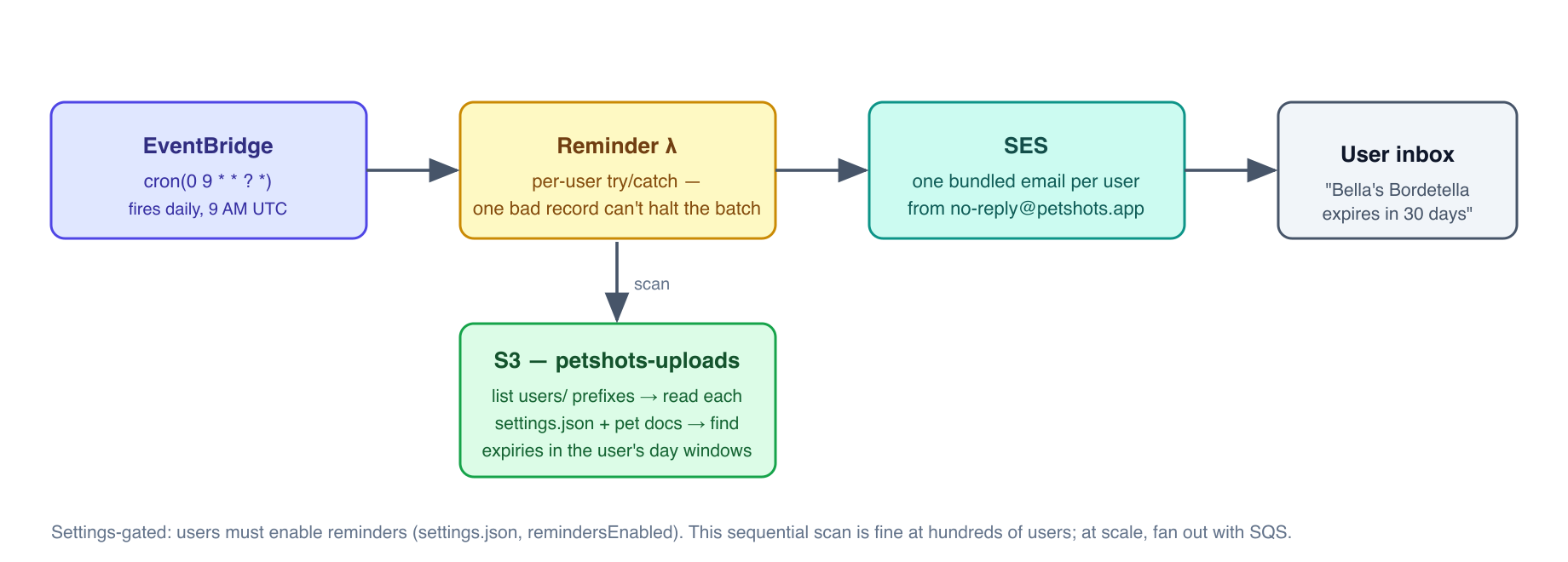
At small scale (hundreds of users), doing this sequentially in one Lambda execution works fine. At large scale (hundreds of thousands of users), the Lambda would time out (remember: 15-minute maximum). The architectural migration: use SQS (Simple Queue Service) — remember, SQS stands for Simple Queue Service — to enqueue one message per user, then process messages concurrently with many Lambda invocations. This is a core SAA-C03 pattern: EventBridge → SQS → Lambda for scalable, reliable fan-out processing.
Infrastructure as Code
Why Not Click? The Case Against ClickOps
When I started with AWS, I clicked everything in the console. It felt productive. You can see exactly what you are doing. But after a few sessions of building, I hit a wall: I could not reliably remember every setting I had configured, I could not reproduce the environment from scratch, and one wrong click could delete a resource I spent an hour configuring.
ClickOps — managing infrastructure through the console — has fundamental business risks:
No audit trail: unless CloudTrail is capturing every action, there is no record of who changed what and when.
No reproducibility: “can you spin up an identical staging environment?” is a nightmare question for a ClickOps shop.
Configuration drift: dev and prod inevitably diverge, because the same set of clicks is never made exactly the same way twice.
No peer review: code changes go through pull requests. Console clicks do not.
IaC (Infrastructure as Code) solves all of these. You describe your desired infrastructure in code, commit it to git, review changes as diffs, and let the tooling apply it consistently every time.
CDK — TypeScript That Compiles to Infrastructure
CDK (Cloud Development Kit) is AWS’s IaC framework that lets you write infrastructure definitions in real programming languages: TypeScript, Python, Java, Go. CDK constructs are composable building blocks — a Vpc construct handles all the subnet creation, route tables, and gateway configuration that would take pages of raw CloudFormation YAML.
Under the hood, CDK compiles to CloudFormation — AWS’s foundational IaC service. cdk synth outputs the CloudFormation template; cdk deploy uploads it and tells CloudFormation to apply it.
The deployment workflow:
cd infra
npx cdk synth          # Compile TypeScript → CloudFormation templates (review these!)
npx cdk diff           # Show what will change vs what is currently deployed
npx cdk deploy PetshotsApiStack   # Deploy one specific stack
npx cdk deploy --all   # Deploy all stacks (careful — check the diff first)
CloudFormation — The Deployment Engine
CloudFormation reads your template, compares it to the currently deployed state, computes a change set (the diff of what needs to be created, modified, or deleted), and executes it in the correct dependency order.
Dependency ordering matters enormously. If Stack A exports a VPC ID and Stack B imports it, CloudFormation will:
Deploy Stack A first
Refuse to delete Stack A while Stack B imports from it
Update Stack A’s export before touching Stack B’s import
This prevents the class of bug where you delete a shared resource that something else depends on.
Stacks are the unit of deployment. Petshots has five:
StackWhat it containsCan it be destroyed safely?NetworkStackVPC, subnets, NAT, S3 gateway endpointYes (no user data)AuthStackCognito User PoolNO — destroys all user accountsDataStackAurora clusterNO — destroys the databaseApiStackLambda, API Gateway, uploads S3 bucketNO — destroys uploaded filesFrontendStackCloudFront, SPA S3 bucket, ACM, Route 53Low risk (rebuildable SPA)
RemovalPolicy — Protecting Production Data from Accidents
By default, when you cdk destroy a stack, CDK tells CloudFormation to delete all the resources in it. For a Lambda or an EC2 instance, this is correct behavior — they are ephemeral. For a Cognito User Pool containing user accounts, or an S3 bucket containing users’ vaccine documents, this would be catastrophic.
Setting RemovalPolicy.RETAIN tells CloudFormation: if this stack is ever destroyed, leave this resource in place as an orphan. The resource continues to exist and incur charges, but it is no longer managed by CloudFormation. You must delete it manually — which requires a deliberate, audited action.
For the Aurora cluster, we also set deletionProtection: true at the RDS (Relational Database Service) API level. This means even a direct API call to delete the cluster will fail — you must first explicitly disable deletion protection, then delete. Two-step protection against accidents.
Exam Tip: The exam tests RemovalPolicy in scenarios about data protection during stack teardown. RETAIN is the correct answer for stateful resources containing user data. Combined with RDS deletion protection and S3 bucket versioning, this provides multiple layers of protection against accidental data loss — a core reliability pattern.
The Three-Tier Architecture (SAA-C03 Exam Pattern)
Even though Petshots went serverless in production, the AppStack (ALB — remember, ALB stands for Application Load Balancer → ASG — Auto Scaling Group → Aurora) stays in the codebase as an SAA-C03 study artifact. The three-tier architecture is the most-tested pattern on the exam. You need to know it well.
Internet
    │
    ▼
ALB (Application Load Balancer)    ← public subnets, two AZs
    │  HTTP/HTTPS routing + health checks
    ▼
ASG (Auto Scaling Group)           ← private (PRIVATE_WITH_EGRESS) subnets
    │  EC2 instances running the application
    ▼
Aurora (RDS)                       ← data (PRIVATE_ISOLATED) subnets
ALB — Layer 7 Load Balancing
An ALB (Application Load Balancer) operates at Layer 7 of the OSI (Open Systems Interconnection) model — the HTTP application layer. This means it understands URLs, headers, cookies, and hostnames. It can route differently based on path (/api/* vs /*), hostname (api.petshots.app vs petshots.app), or headers.
Core ALB capabilities:
Load distribution: sends traffic to registered targets (EC2 instances) in a round-robin or weighted fashion.
Health checks: periodically probes each instance at a configured path. If an instance fails health checks, the ALB stops sending traffic to it automatically.
TLS termination: the ALB accepts HTTPS from clients, decrypts it, and sends plain HTTP to backend instances. Backend instances do not need to handle TLS.
Exam Tip — ALB vs NLB (Network Load Balancer) vs CLB (Classic Load Balancer):
ALBNLBCLBOSI Layer7 (HTTP/HTTPS)4 (TCP/UDP)4 and 7 (legacy)Use caseWeb apps, microservices, path/host routingUltra-low latency, static IP, raw TCPLegacy (avoid)Static IPNoYes (Elastic IP)NoWebSocketYesYesNo
Choose ALB for HTTP workloads (most web applications). Choose NLB when the question mentions static IP for whitelisting, ultra-low latency, or raw TCP/UDP (e.g., game servers, IoT). NLB is also the answer when you need to attach an Elastic IP (a fixed public IP address) to a load balancer — ALBs have no fixed IP.
ASG — Auto Scaling Groups
An ASG (Auto Scaling Group) manages a fleet of identical EC2 instances, maintaining them within configured bounds:
Minimum: the floor — never fewer than this many instances (provides HA).
Desired: the target count under current load.
Maximum: the ceiling — never more than this many instances (cost control).
Instances are created from a Launch Template specifying the AMI (Amazon Machine Image — the operating system + software snapshot), instance type, Security Group, IAM role, and user-data script (shell commands that run at first boot to configure the instance).
Scaling policies:
Policy TypeHow it worksWhen to useManualYou set desired count directlyPredictable, one-time changesScheduledScale to N at time TKnown recurring patterns (Mon morning traffic)Target tracking”Keep avg CPU at 50%” — ASG adjusts automaticallyRecommended defaultStep scalingDifferent adjustments at different thresholdsCustom, step-function response curvesPredictiveML model predicts demand, scales proactivelyHigh-volume apps with consistent patterns
Exam Tip: Target tracking is the recommended default for most workloads. Scheduled scaling is the answer when the scenario describes known predictable demand spikes (e.g., a media company that knows traffic spikes at 8 PM). Predictive scaling is the answer when historical data is mentioned.
Aurora Serverless v2 — The Cost-Optimized Database
Aurora Serverless v2 scales compute capacity in ACU (Aurora Capacity Unit) increments — where each Aurora Capacity Unit is approximately 2 GB of RAM with proportional CPU. At min ACU = 0 (scale-to-zero), the cluster suspends all compute when idle, charging only for storage. When a query arrives, it resumes in seconds.
For Petshots at this stage, the Aurora cluster exists in the infrastructure for exam-study purposes and potential future use — the serverless API stores all data in S3 today. But it is running (in scale-to-zero state) and retained by RemovalPolicy.
Exam Tip — Aurora vs RDS vs DynamoDB:
RDS (Provisioned)Aurora Serverless v2DynamoDBModelRelational (SQL)Relational (SQL)NoSQL (key-value / document)ScalingManual + read replicasAutomatic (0 to 128 ACUs)Fully automaticCost modelHourly instance chargePer ACU-secondPer request + storageScale-to-zeroNoYes (min ACU 0)N/A (always on, but no idle charge)Multi-regionManual + read replicasAurora GlobalNative Global Tables
Choose Aurora Serverless when you need SQL with unpredictable or spiky traffic. Choose DynamoDB when you need single-digit ms latency at any scale, or a key-value / document model. Choose RDS when you have steady, predictable load and want fine-grained instance control.
Act 8 — Cost Architecture (The Business Lens)
Cost optimization is one of the six pillars of the AWS Well-Architected Framework (Operational Excellence, Security, Reliability, Performance Efficiency, Cost Optimization, and Sustainability — added in 2021). It is tested throughout the SAA-C03 exam and it is a real business concern for any product.
Here is the complete Petshots cost model, annotated with the architectural reasoning:
ComponentMonthly costWhy we made this choiceLambda + API Gateway~$0 idlePay-per-request; zero users = zero costS3 (uploads + frontend)~$0.02~20 GB stored; 23 cents/GB/monthCloudFront~$0 idlePay-per-GB transferredCognitoFreeFirst 50,000 MAUs freeSES~$0 idle$0.10/1,000 emails; we send very fewEventBridge~$0$1/million scheduled invocationsAurora (scale-to-zero)~$0.10Storage only; compute suspendedNAT instance~$3.50t4g.nano, 24/7; the biggest idle costRoute 53 hosted zone$0.50Fixed monthly per zoneSecrets Manager$0.40One secret, fixed monthlyACM$0Free for CloudFront/ALBTotal~$5/month
Compare this to the equivalent three-tier EC2 architecture: ALB (~$16/month)
EC2 t4g.micro (~$6/month) + Aurora (minimum ACU charges). Even with scale-to-zero Aurora, the ALB alone would add $16/month. That is the financial case for going serverless on a pre-revenue product.
Exam Tip — Well-Architected Framework pillars:
Operational Excellence — run and monitor systems; automate changes.
Security — protect data, systems, and assets.
Reliability — recover from failures; meet demand.
Performance Efficiency — use resources efficiently; avoid over-provisioning.
Cost Optimization — avoid unnecessary cost; right-size resources.
Sustainability — minimize environmental impact; maximize resource utilization.
Exam questions often reference these pillars explicitly: “which option is MOST cost-effective while maintaining reliability?” You are being tested on your ability to balance competing pillars, not to maximize any single one.
The Full Request Lifecycle — Annotated
Here is the complete flow for a document upload, annotated with every AWS service involved. Study this walkthrough: the exam frequently describes this type of multi-service flow and asks which service is responsible for which behavior.
Start with the sequence diagram — four actors, eight steps. The one thing to burn into memory is step 7: the file travels the green arrow, straight from the browser to S3, touching neither API Gateway nor Lambda:
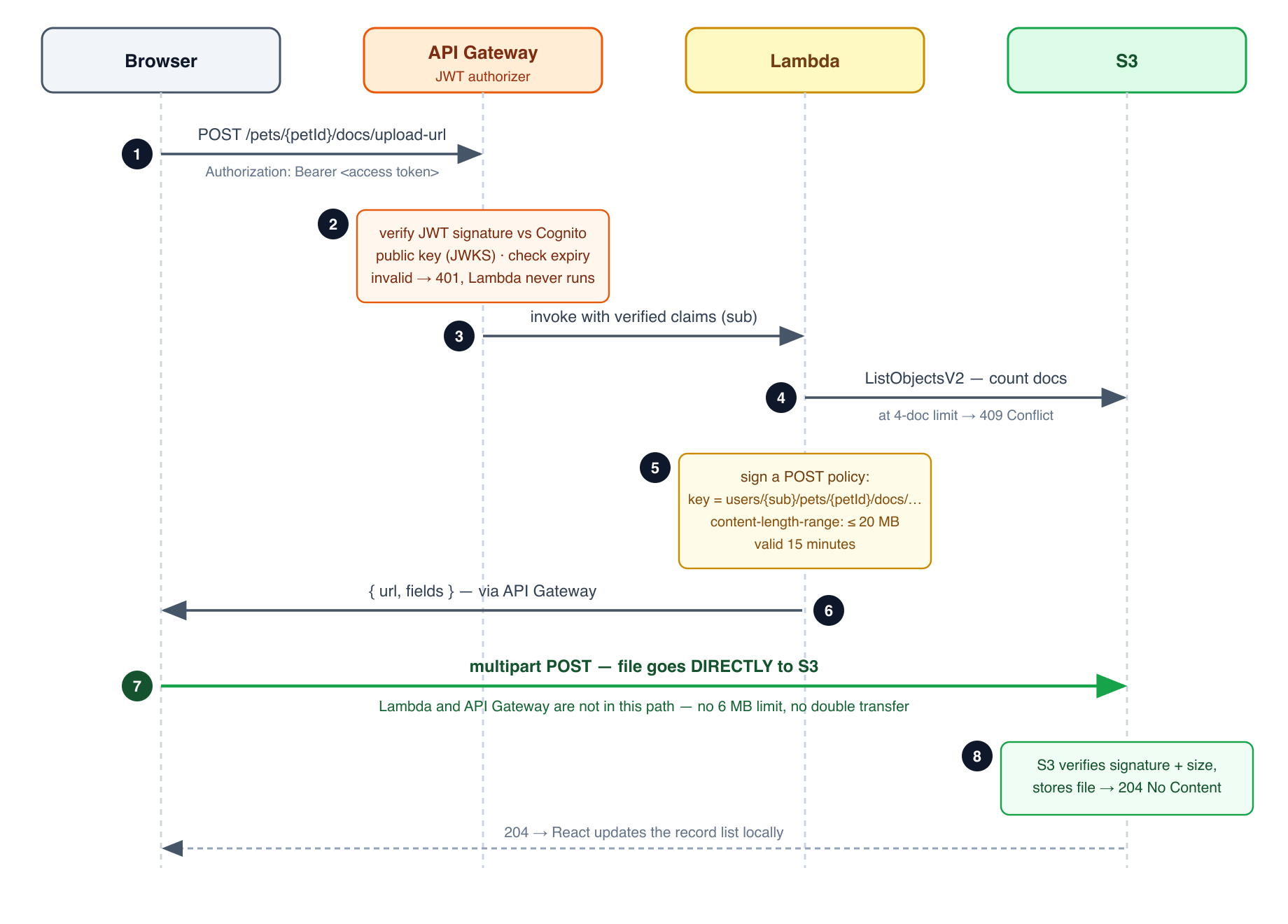
Now the same flow step by step, with the details that matter:
1. User taps "Add Record" on phone.
   → Browser: React SPA running in Safari/Chrome.

2. SPA sends: POST /pets/abc123/docs/upload-url
   Header: Authorization: Bearer eyJ... (the Cognito Access Token)
   → Network: HTTPS to petshots.app → CloudFront edge location → API Gateway.

3. API Gateway: receives the HTTP request.
   → JWT Authorizer downloads Cognito's JWKS (JSON Web Key Set, cached).
   → Verifies the JWT signature using Cognito's RSA public key.
   → Checks token expiry (the `exp` claim).
   → Extracts `sub` (user ID) from the JWT payload.
   → If valid: routes to Lambda. If invalid: returns 401 Unauthorized.
      (Lambda is not invoked; no cost incurred.)

4. Lambda (Node.js, ARM64) runs.
   → Reads the `sub` from event.requestContext.authorizer.jwt.claims.sub.
   → Calls S3 ListObjectsV2 on the user's doc prefix to count existing docs.
   → If count >= MAX_DOCS: returns 409 Conflict. Upload rejected.
   → Calls S3 CreatePresignedPost with:
       - Bucket: petshots-uploads
       - Key prefix: users/{sub}/pets/{petId}/docs/{uuid}/
       - content-length-range: 0 to 20971520 bytes
       - Expiry: 5 minutes
   → Returns { url, fields } to the browser.

5. API Gateway → Browser: { url, fields } as JSON.

6. Browser: constructs a multipart/form-data POST directly to S3.
   → Uses the presigned `url` and `fields` from step 5.
   → Includes the actual file content.
   → S3 verifies the signature, checks content-length-range,
      checks content-type, accepts the upload.
   → File is now stored at:
      s3://petshots-uploads/users/{sub}/pets/{petId}/docs/{uuid}/
          {url-encoded JSON label+expiry}/{original filename}
   → S3 returns 204 No Content.

7. Browser: updates the UI optimistically. No further server calls needed.
On the exam:
“How do browsers upload files to S3 without AWS credentials?” → Presigned POST policy
“Which service validates user identity before Lambda runs?” → API Gateway JWT Authorizer
“How does Lambda call S3 without hardcoded credentials?” → IAM execution role (STS-issued temporary credentials)
“Why did we design the upload to bypass Lambda for the file transfer?” → Lambda’s 6 MB payload limit
Afterword — What Building This Taught Me
I started this project to solve a real problem. I ended it with a production SaaS application that has handled real signups, stored real vaccine documents, and sent real email reminders.
But the thing I did not expect was how much the process of building it aligned with the SAA-C03 certification path. Every decision I made — NAT instance vs NAT Gateway, HTTP API vs REST API, S3 for metadata vs Aurora, RemovalPolicy RETAIN vs DESTROY — is a variation on a question the exam asks. The difference is that when you make these decisions with real money and real users at stake, the reasoning becomes visceral rather than academic.
When you read in an exam question “a startup needs to minimize idle costs while maintaining the ability to scale,” you now know exactly what that means. You have felt the difference between a $0/month Lambda and a $22/month EC2 tier. You have debugged a Secrets Manager ARN mismatch at 11 PM. You have pushed a frontend build and forgotten to run the CloudFront invalidation, and then wondered for twenty minutes why the update was not showing up.
That is the kind of knowledge that sticks.
The app is live at
. The code is on GitHub as petshots. If you are working through the SAA-C03 and you want to see how these services wire together in production, go look at the source.
And if you have a dog who needs his shots — that is what we built it for.
Mark Gingrass — Petshots founder — July 2026
Questions, corrections, or feedback: mark.gingrass@gmail.com